|
|
完整案例原生UI功能演示
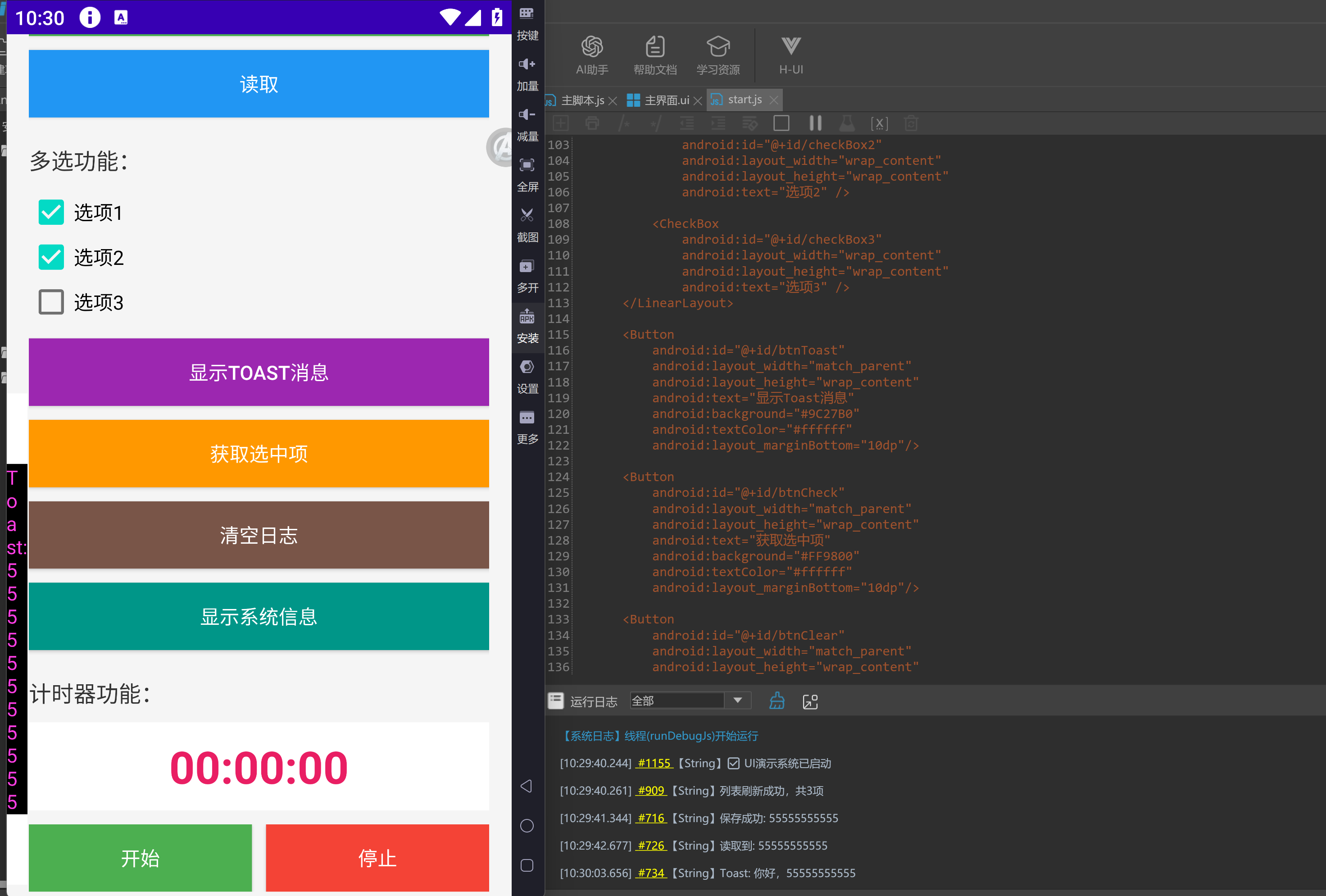
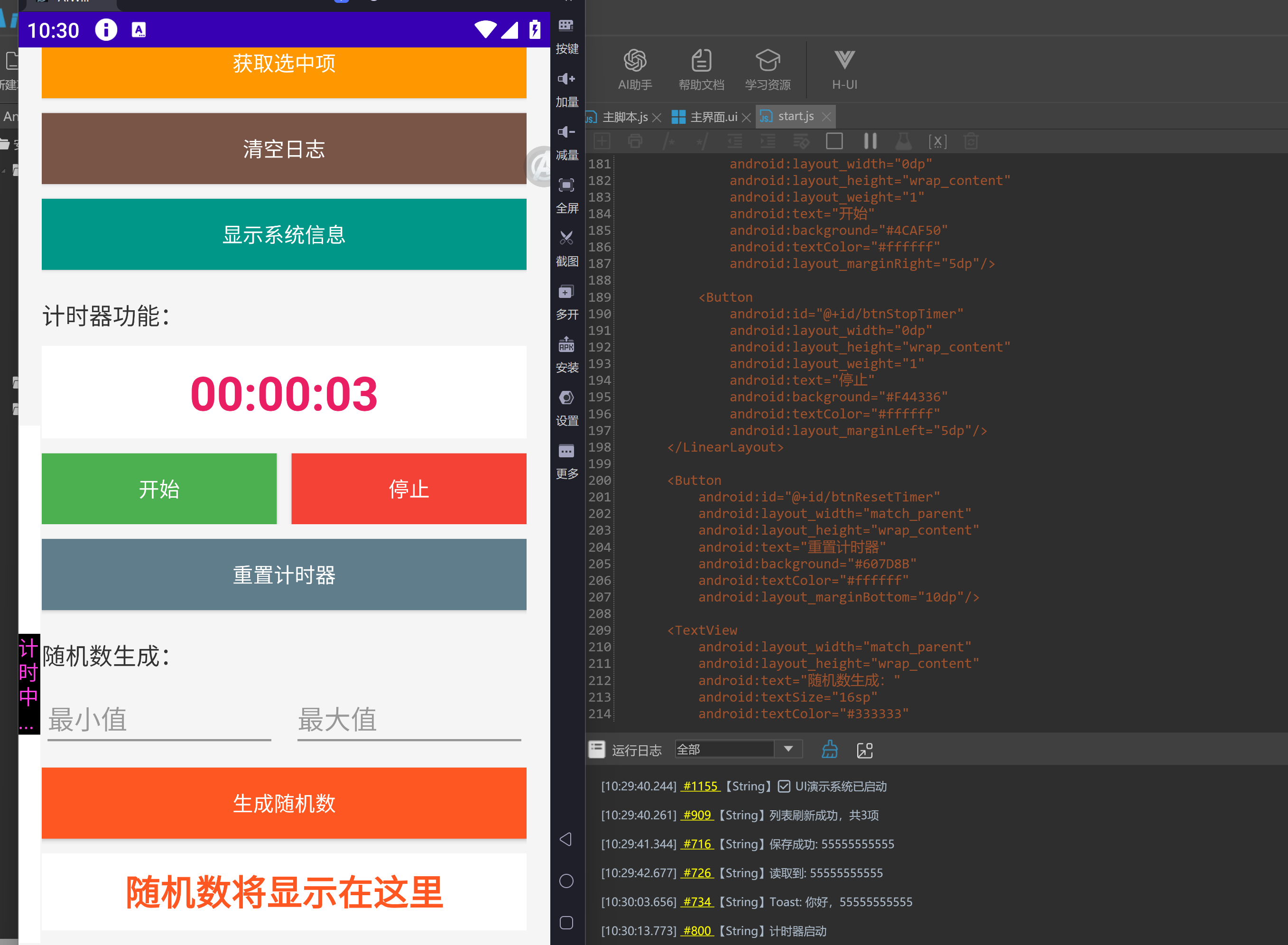
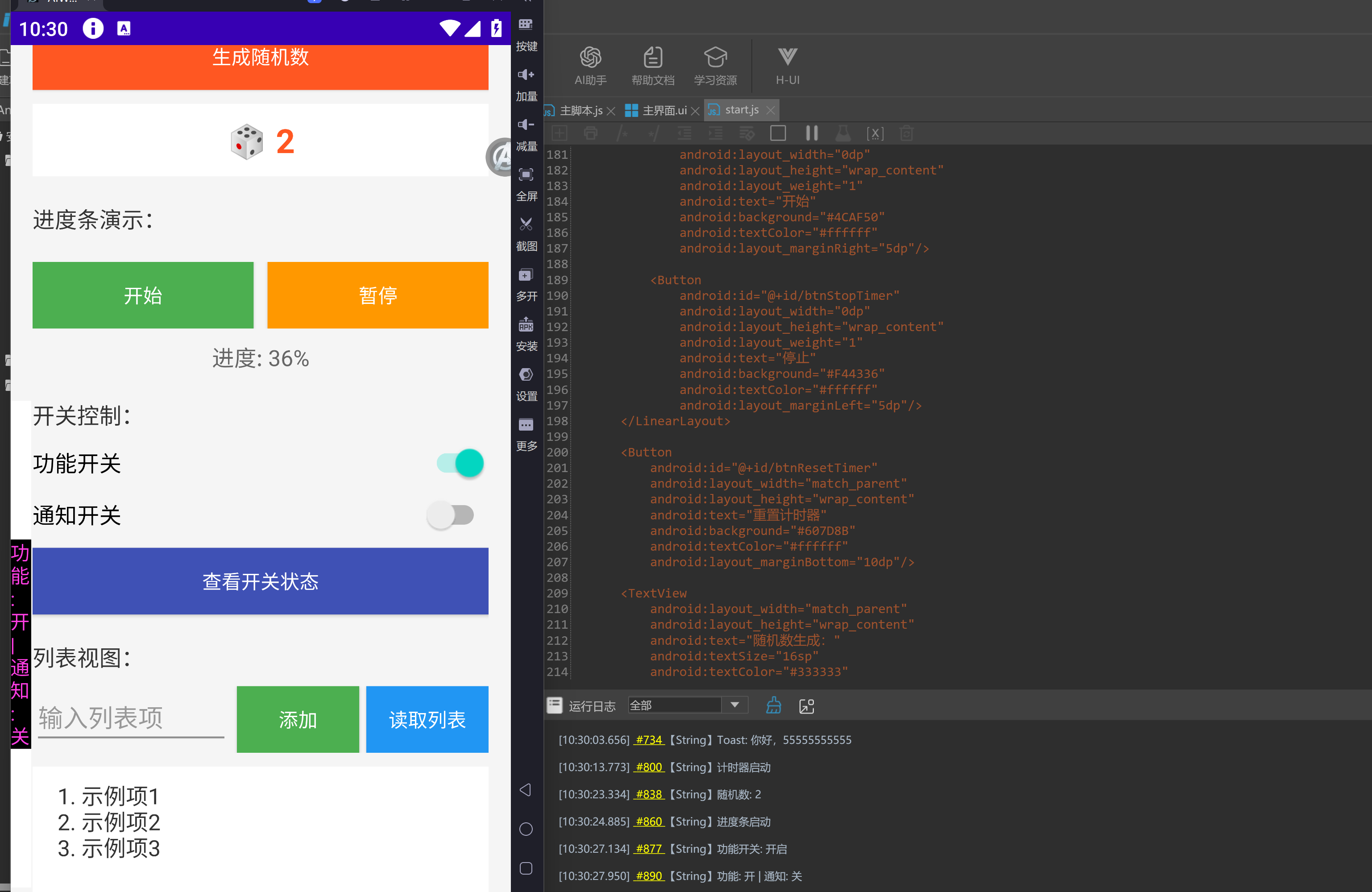
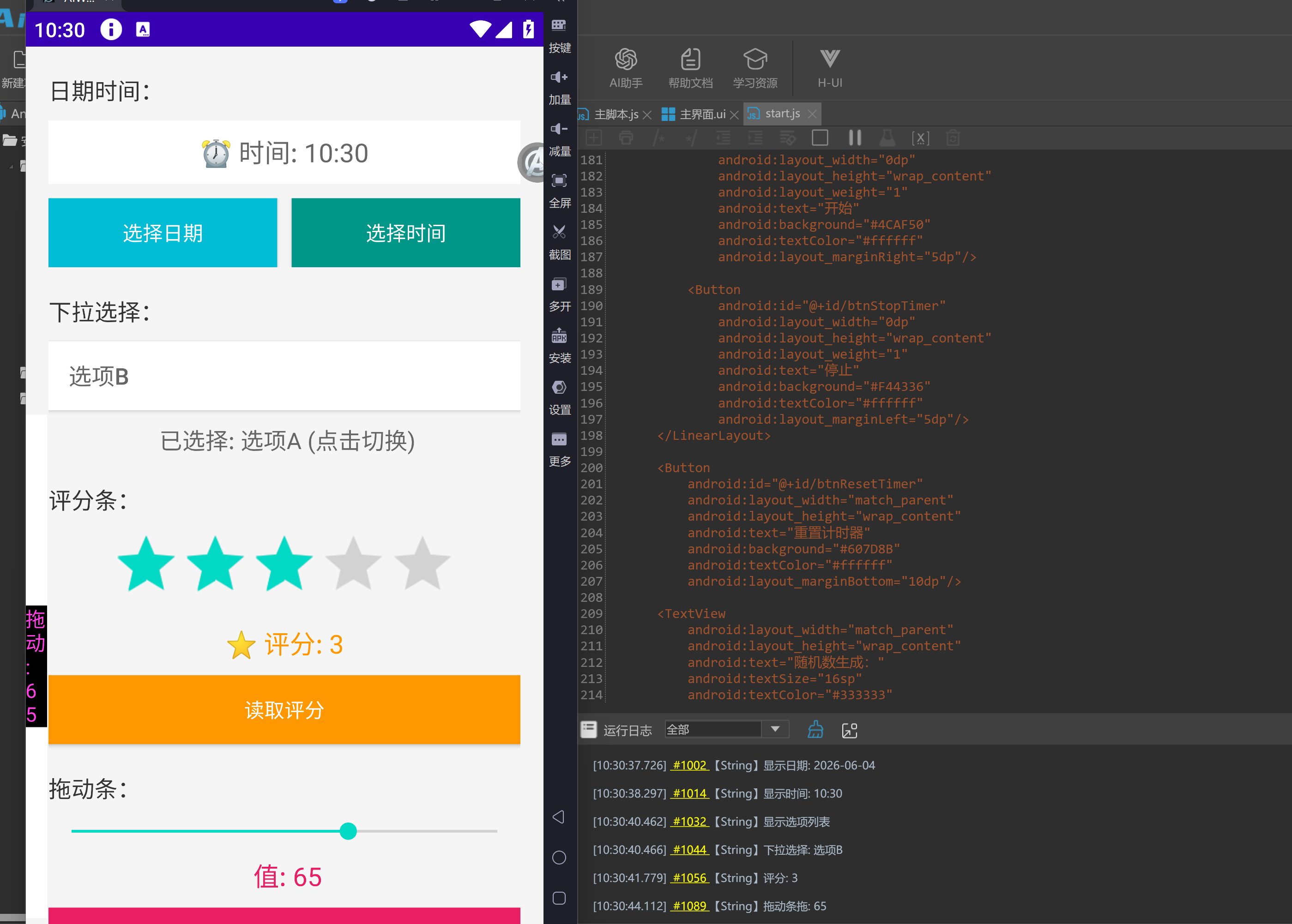
- /**
- * AIWROK 原生UI功能演示
- * 交流QQ群: 711841924 (群一) / 528816639 (苹果内测群)
- * 整合:文本框 + 按钮 + 配置保存 + 日志显示 + 多选框 + Toast消息 + 日志悬浮窗 + 多按钮操作 + 计时器 + 进度条 + 开关 + 列表 + 对话框 + 日期时间 + 下拉选择 + 评分条 + 拖动条
- */
- var ac = new activity();
- ac.loadSXML(`
- <ScrollView
- android:layout_width="match_parent"
- android:layout_height="match_parent">
- <LinearLayout
- android:layout_width="match_parent"
- android:layout_height="wrap_content"
- android:orientation="vertical"
- android:padding="16dp"
- android:background="#f5f5f5">
- <TextView
- android:layout_width="match_parent"
- android:layout_height="wrap_content"
- android:text="AIWROK UI演示"
- android:textSize="24sp"
- android:textStyle="bold"
- android:textColor="#333333"
- android:gravity="center"
- android:layout_marginBottom="10dp"/>
- <!-- QQ群信息 -->
- <LinearLayout
- android:layout_width="match_parent"
- android:layout_height="wrap_content"
- android:orientation="vertical"
- android:background="#FFF3E0"
- android:padding="10dp"
- android:layout_marginBottom="15dp">
- <TextView
- android:layout_width="match_parent"
- android:layout_height="wrap_content"
- android:text="🍎 交流QQ群:711841924(群)"
- android:textSize="14sp"
- android:textColor="#E65100"
- android:gravity="center"
- android:layout_marginBottom="5dp"/>
- <TextView
- android:layout_width="match_parent"
- android:layout_height="wrap_content"
- android:text="🍎 交流QQ群:528816639(安卓内测群)"
- android:textSize="14sp"
- android:textColor="#E65100"
- android:gravity="center"/>
- </LinearLayout>
- <EditText
- android:id="@+id/etUser"
- android:layout_width="match_parent"
- android:layout_height="wrap_content"
- android:hint="输入用户名"
- android:layout_marginBottom="10dp"/>
- <Button
- android:id="@+id/btnSave"
- android:layout_width="match_parent"
- android:layout_height="wrap_content"
- android:text="保存"
- android:background="#4CAF50"
- android:textColor="#ffffff"
- android:layout_marginBottom="10dp"/>
- <Button
- android:id="@+id/btnLoad"
- android:layout_width="match_parent"
- android:layout_height="wrap_content"
- android:text="读取"
- android:background="#2196F3"
- android:textColor="#ffffff"
- android:layout_marginBottom="20dp"/>
- <TextView
- android:layout_width="match_parent"
- android:layout_height="wrap_content"
- android:text="多选功能:"
- android:textSize="16sp"
- android:textColor="#333333"
- android:layout_marginBottom="10dp"/>
- <LinearLayout
- android:id="@+id/checkBoxLayout"
- android:layout_width="match_parent"
- android:layout_height="wrap_content"
- android:orientation="vertical"
- android:layout_marginBottom="10dp">
- <CheckBox
- android:id="@+id/checkBox1"
- android:layout_width="wrap_content"
- android:layout_height="wrap_content"
- android:text="选项1" />
- <CheckBox
- android:id="@+id/checkBox2"
- android:layout_width="wrap_content"
- android:layout_height="wrap_content"
- android:text="选项2" />
- <CheckBox
- android:id="@+id/checkBox3"
- android:layout_width="wrap_content"
- android:layout_height="wrap_content"
- android:text="选项3" />
- </LinearLayout>
- <Button
- android:id="@+id/btnToast"
- android:layout_width="match_parent"
- android:layout_height="wrap_content"
- android:text="显示Toast消息"
- android:background="#9C27B0"
- android:textColor="#ffffff"
- android:layout_marginBottom="10dp"/>
- <Button
- android:id="@+id/btnCheck"
- android:layout_width="match_parent"
- android:layout_height="wrap_content"
- android:text="获取选中项"
- android:background="#FF9800"
- android:textColor="#ffffff"
- android:layout_marginBottom="10dp"/>
- <Button
- android:id="@+id/btnClear"
- android:layout_width="match_parent"
- android:layout_height="wrap_content"
- android:text="清空日志"
- android:background="#795548"
- android:textColor="#ffffff"
- android:layout_marginBottom="10dp"/>
- <Button
- android:id="@+id/btnInfo"
- android:layout_width="match_parent"
- android:layout_height="wrap_content"
- android:text="显示系统信息"
- android:background="#009688"
- android:textColor="#ffffff"
- android:layout_marginBottom="10dp"/>
- <TextView
- android:layout_width="match_parent"
- android:layout_height="wrap_content"
- android:text="计时器功能:"
- android:textSize="16sp"
- android:textColor="#333333"
- android:layout_marginTop="10dp"
- android:layout_marginBottom="10dp"/>
- <TextView
- android:id="@+id/tvTimer"
- android:layout_width="match_parent"
- android:layout_height="wrap_content"
- android:text="00:00:00"
- android:textSize="32sp"
- android:textStyle="bold"
- android:textColor="#E91E63"
- android:gravity="center"
- android:padding="10dp"
- android:background="#ffffff"
- android:layout_marginBottom="10dp"/>
- <LinearLayout
- android:layout_width="match_parent"
- android:layout_height="wrap_content"
- android:orientation="horizontal"
- android:layout_marginBottom="10dp">
- <Button
- android:id="@+id/btnStartTimer"
- android:layout_width="0dp"
- android:layout_height="wrap_content"
- android:layout_weight="1"
- android:text="开始"
- android:background="#4CAF50"
- android:textColor="#ffffff"
- android:layout_marginRight="5dp"/>
- <Button
- android:id="@+id/btnStopTimer"
- android:layout_width="0dp"
- android:layout_height="wrap_content"
- android:layout_weight="1"
- android:text="停止"
- android:background="#F44336"
- android:textColor="#ffffff"
- android:layout_marginLeft="5dp"/>
- </LinearLayout>
- <Button
- android:id="@+id/btnResetTimer"
- android:layout_width="match_parent"
- android:layout_height="wrap_content"
- android:text="重置计时器"
- android:background="#607D8B"
- android:textColor="#ffffff"
- android:layout_marginBottom="10dp"/>
- <TextView
- android:layout_width="match_parent"
- android:layout_height="wrap_content"
- android:text="随机数生成:"
- android:textSize="16sp"
- android:textColor="#333333"
- android:layout_marginTop="10dp"
- android:layout_marginBottom="10dp"/>
- <LinearLayout
- android:layout_width="match_parent"
- android:layout_height="wrap_content"
- android:orientation="horizontal"
- android:layout_marginBottom="10dp">
- <EditText
- android:id="@+id/etMin"
- android:layout_width="0dp"
- android:layout_height="wrap_content"
- android:layout_weight="1"
- android:hint="最小值"
- android:inputType="number"
- android:layout_marginRight="5dp"/>
- <EditText
- android:id="@+id/etMax"
- android:layout_width="0dp"
- android:layout_height="wrap_content"
- android:layout_weight="1"
- android:hint="最大值"
- android:inputType="number"
- android:layout_marginLeft="5dp"/>
- </LinearLayout>
- <Button
- android:id="@+id/btnRandom"
- android:layout_width="match_parent"
- android:layout_height="wrap_content"
- android:text="生成随机数"
- android:background="#FF5722"
- android:textColor="#ffffff"
- android:layout_marginBottom="10dp"/>
- <TextView
- android:id="@+id/tvRandom"
- android:layout_width="match_parent"
- android:layout_height="wrap_content"
- android:text="随机数将显示在这里"
- android:textSize="24sp"
- android:textStyle="bold"
- android:textColor="#FF5722"
- android:gravity="center"
- android:padding="10dp"
- android:background="#ffffff"
- android:layout_marginBottom="10dp"/>
- <TextView
- android:layout_width="match_parent"
- android:layout_height="wrap_content"
- android:text="进度条演示:"
- android:textSize="16sp"
- android:textColor="#333333"
- android:layout_marginTop="10dp"
- android:layout_marginBottom="10dp"/>
- <ProgressBar
- android:id="@+id/progressBar"
- style="?android:attr/progressBarStyleHorizontal"
- android:layout_width="match_parent"
- android:layout_height="wrap_content"
- android:max="100"
- android:progress="0"
- android:layout_marginBottom="10dp"/>
- <LinearLayout
- android:layout_width="match_parent"
- android:layout_height="wrap_content"
- android:orientation="horizontal"
- android:layout_marginBottom="10dp">
- <Button
- android:id="@+id/btnProgressStart"
- android:layout_width="0dp"
- android:layout_height="wrap_content"
- android:layout_weight="1"
- android:text="开始"
- android:background="#4CAF50"
- android:textColor="#ffffff"
- android:layout_marginRight="5dp"/>
- <Button
- android:id="@+id/btnProgressPause"
- android:layout_width="0dp"
- android:layout_height="wrap_content"
- android:layout_weight="1"
- android:text="暂停"
- android:background="#FF9800"
- android:textColor="#ffffff"
- android:layout_marginLeft="5dp"/>
- </LinearLayout>
- <TextView
- android:id="@+id/tvProgress"
- android:layout_width="match_parent"
- android:layout_height="wrap_content"
- android:text="进度: 0%"
- android:textSize="16sp"
- android:textColor="#666666"
- android:gravity="center"
- android:layout_marginBottom="10dp"/>
- <TextView
- android:layout_width="match_parent"
- android:layout_height="wrap_content"
- android:text="开关控制:"
- android:textSize="16sp"
- android:textColor="#333333"
- android:layout_marginTop="10dp"
- android:layout_marginBottom="10dp"/>
- <Switch
- android:id="@+id/switch1"
- android:layout_width="match_parent"
- android:layout_height="wrap_content"
- android:text="功能开关"
- android:textSize="16sp"
- android:layout_marginBottom="10dp"/>
- <Switch
- android:id="@+id/switch2"
- android:layout_width="match_parent"
- android:layout_height="wrap_content"
- android:text="通知开关"
- android:textSize="16sp"
- android:layout_marginBottom="10dp"/>
- <Button
- android:id="@+id/btnSwitchStatus"
- android:layout_width="match_parent"
- android:layout_height="wrap_content"
- android:text="查看开关状态"
- android:background="#3F51B5"
- android:textColor="#ffffff"
- android:layout_marginBottom="10dp"/>
- <TextView
- android:layout_width="match_parent"
- android:layout_height="wrap_content"
- android:text="列表视图:"
- android:textSize="16sp"
- android:textColor="#333333"
- android:layout_marginTop="10dp"
- android:layout_marginBottom="10dp"/>
- <LinearLayout
- android:layout_width="match_parent"
- android:layout_height="wrap_content"
- android:orientation="horizontal"
- android:layout_marginBottom="10dp">
- <EditText
- android:id="@+id/etListItem"
- android:layout_width="0dp"
- android:layout_height="wrap_content"
- android:layout_weight="1"
- android:hint="输入列表项"
- android:layout_marginRight="5dp"/>
- <Button
- android:id="@+id/btnAddItem"
- android:layout_width="wrap_content"
- android:layout_height="wrap_content"
- android:text="添加"
- android:background="#4CAF50"
- android:textColor="#ffffff"
- android:layout_marginRight="5dp"/>
-
- <Button
- android:id="@+id/btnReadList"
- android:layout_width="wrap_content"
- android:layout_height="wrap_content"
- android:text="读取列表"
- android:background="#2196F3"
- android:textColor="#ffffff"/>
- </LinearLayout>
- <TextView
- android:id="@+id/listView"
- android:layout_width="match_parent"
- android:layout_height="150dp"
- android:text="示例项1\n示例项2\n示例项3"
- android:textSize="16sp"
- android:textColor="#333333"
- android:background="#ffffff"
- android:padding="10dp"
- android:gravity="left|top"
- android:scrollbars="vertical"
- android:layout_marginBottom="10dp"/>
- <TextView
- android:layout_width="match_parent"
- android:layout_height="wrap_content"
- android:text="对话框演示:"
- android:textSize="16sp"
- android:textColor="#333333"
- android:layout_marginTop="10dp"
- android:layout_marginBottom="10dp"/>
- <LinearLayout
- android:layout_width="match_parent"
- android:layout_height="wrap_content"
- android:orientation="horizontal"
- android:layout_marginBottom="10dp">
- <Button
- android:id="@+id/btnDialog1"
- android:layout_width="0dp"
- android:layout_height="wrap_content"
- android:layout_weight="1"
- android:text="确认框"
- android:background="#2196F3"
- android:textColor="#ffffff"
- android:layout_marginRight="5dp"/>
- <Button
- android:id="@+id/btnDialog2"
- android:layout_width="0dp"
- android:layout_height="wrap_content"
- android:layout_weight="1"
- android:text="输入框"
- android:background="#9C27B0"
- android:textColor="#ffffff"
- android:layout_marginLeft="5dp"/>
- </LinearLayout>
- <TextView
- android:layout_width="match_parent"
- android:layout_height="wrap_content"
- android:text="日期时间:"
- android:textSize="16sp"
- android:textColor="#333333"
- android:layout_marginTop="10dp"
- android:layout_marginBottom="10dp"/>
- <TextView
- android:id="@+id/tvDateTime"
- android:layout_width="match_parent"
- android:layout_height="wrap_content"
- android:text="点击按钮选择日期时间"
- android:textSize="18sp"
- android:textColor="#666666"
- android:gravity="center"
- android:padding="10dp"
- android:background="#ffffff"
- android:layout_marginBottom="10dp"/>
- <LinearLayout
- android:layout_width="match_parent"
- android:layout_height="wrap_content"
- android:orientation="horizontal"
- android:layout_marginBottom="10dp">
- <Button
- android:id="@+id/btnDatePicker"
- android:layout_width="0dp"
- android:layout_height="wrap_content"
- android:layout_weight="1"
- android:text="选择日期"
- android:background="#00BCD4"
- android:textColor="#ffffff"
- android:layout_marginRight="5dp"/>
- <Button
- android:id="@+id/btnTimePicker"
- android:layout_width="0dp"
- android:layout_height="wrap_content"
- android:layout_weight="1"
- android:text="选择时间"
- android:background="#009688"
- android:textColor="#ffffff"
- android:layout_marginLeft="5dp"/>
- </LinearLayout>
- <TextView
- android:layout_width="match_parent"
- android:layout_height="wrap_content"
- android:text="下拉选择:"
- android:textSize="16sp"
- android:textColor="#333333"
- android:layout_marginTop="10dp"
- android:layout_marginBottom="10dp"/>
- <Button
- android:id="@+id/spinner"
- android:layout_width="match_parent"
- android:layout_height="wrap_content"
- android:text=" 请选择..."
- android:background="#ffffff"
- android:textColor="#666666"
- android:textSize="16sp"
- android:gravity="left|center_vertical"
- android:padding="10dp"
- android:layout_marginBottom="10dp"/>
- <TextView
- android:id="@+id/tvSpinner"
- android:layout_width="match_parent"
- android:layout_height="wrap_content"
- android:text="请选择..."
- android:textSize="16sp"
- android:textColor="#666666"
- android:gravity="center"
- android:layout_marginBottom="10dp"/>
- <TextView
- android:layout_width="match_parent"
- android:layout_height="wrap_content"
- android:text="评分条:"
- android:textSize="16sp"
- android:textColor="#333333"
- android:layout_marginTop="10dp"
- android:layout_marginBottom="10dp"/>
- <RatingBar
- android:id="@+id/ratingBar"
- android:layout_width="wrap_content"
- android:layout_height="wrap_content"
- android:numStars="5"
- android:stepSize="0.5"
- android:rating="0"
- android:layout_gravity="center"
- android:layout_marginBottom="10dp"/>
- <TextView
- android:id="@+id/tvRating"
- android:layout_width="match_parent"
- android:layout_height="wrap_content"
- android:text="评分: 0"
- android:textSize="18sp"
- android:textColor="#FF9800"
- android:gravity="center"
- android:layout_marginBottom="10dp"/>
- <Button
- android:id="@+id/btnReadRating"
- android:layout_width="match_parent"
- android:layout_height="wrap_content"
- android:text="读取评分"
- android:background="#FF9800"
- android:textColor="#ffffff"
- android:layout_marginBottom="10dp"/>
- <TextView
- android:layout_width="match_parent"
- android:layout_height="wrap_content"
- android:text="拖动条:"
- android:textSize="16sp"
- android:textColor="#333333"
- android:layout_marginTop="10dp"
- android:layout_marginBottom="10dp"/>
- <SeekBar
- android:id="@+id/seekBar"
- android:layout_width="match_parent"
- android:layout_height="wrap_content"
- android:max="100"
- android:progress="50"
- android:layout_marginBottom="10dp"/>
- <TextView
- android:id="@+id/tvSeekBar"
- android:layout_width="match_parent"
- android:layout_height="wrap_content"
- android:text="值: 50"
- android:textSize="18sp"
- android:textColor="#E91E63"
- android:gravity="center"
- android:layout_marginBottom="10dp"/>
- <Button
- android:id="@+id/btnReadSeekBar"
- android:layout_width="match_parent"
- android:layout_height="wrap_content"
- android:text="读取拖动条值"
- android:background="#E91E63"
- android:textColor="#ffffff"
- android:layout_marginBottom="10dp"/>
- <TextView
- android:layout_width="match_parent"
- android:layout_height="wrap_content"
- android:text="运行控制:"
- android:textSize="18sp"
- android:textStyle="bold"
- android:textColor="#333333"
- android:layout_marginTop="20dp"
- android:layout_marginBottom="10dp"/>
- <Button
- android:id="@+id/btnRunMain"
- android:layout_width="match_parent"
- android:layout_height="wrap_content"
- android:text="▶ 开始运行主脚本"
- android:background="#F44336"
- android:textColor="#ffffff"
- android:textSize="18sp"
- android:padding="15dp"
- android:layout_marginBottom="10dp"/>
- <TextView
- android:id="@+id/tvRunStatus"
- android:layout_width="match_parent"
- android:layout_height="wrap_content"
- android:text="状态: 未运行"
- android:textSize="14sp"
- android:textColor="#666666"
- android:gravity="center"
- android:padding="10dp"
- android:background="#ffffff"
- android:layout_marginBottom="20dp"/>
- <TextView
- android:id="@+id/tvLog"
- android:layout_width="match_parent"
- android:layout_height="wrap_content"
- android:text="日志将显示在这里"
- android:textSize="14sp"
- android:textColor="#666666"
- android:padding="10dp"
- android:background="#ffffff"/>
- </LinearLayout>
- </ScrollView>
- `);
- // 日志悬浮窗
- var 日志悬浮窗 = new floatUI();
- 日志悬浮窗.loadXML(
- '<LinearLayout orientation="vertical" w="15" h="350" gravity="center">' +
- ' <TextView id="rz" textColor="#ff3ee4" background="#000000" layout_width="wrap_content" layout_height="wrap_content" />' +
- '</LinearLayout>'
- );
- var g_日志 = 日志悬浮窗.findViewById('rz');
- if (g_日志) {
- setTimeout(function() {
- 日志悬浮窗.setPosition(0, (screen.getScreenHeight() * 0.4));
- g_日志.setText("日志已启动");
- }, 100);
- }
- var etUser = ac.findViewById("etUser");
- var btnSave = ac.findViewById("btnSave");
- var btnLoad = ac.findViewById("btnLoad");
- var btnToast = ac.findViewById("btnToast");
- var btnCheck = ac.findViewById("btnCheck");
- var btnClear = ac.findViewById("btnClear");
- var btnInfo = ac.findViewById("btnInfo");
- var btnStartTimer = ac.findViewById("btnStartTimer");
- var btnStopTimer = ac.findViewById("btnStopTimer");
- var btnResetTimer = ac.findViewById("btnResetTimer");
- var btnRandom = ac.findViewById("btnRandom");
- var tvTimer = ac.findViewById("tvTimer");
- var tvRandom = ac.findViewById("tvRandom");
- var etMin = ac.findViewById("etMin");
- var etMax = ac.findViewById("etMax");
- var progressBar = ac.findViewById("progressBar");
- var btnProgressStart = ac.findViewById("btnProgressStart");
- var btnProgressPause = ac.findViewById("btnProgressPause");
- var tvProgress = ac.findViewById("tvProgress");
- var switch1 = ac.findViewById("switch1");
- var switch2 = ac.findViewById("switch2");
- var btnSwitchStatus = ac.findViewById("btnSwitchStatus");
- var etListItem = ac.findViewById("etListItem");
- var btnAddItem = ac.findViewById("btnAddItem");
- var listView = ac.findViewById("listView");
- var btnDialog1 = ac.findViewById("btnDialog1");
- var btnDialog2 = ac.findViewById("btnDialog2");
- var tvDateTime = ac.findViewById("tvDateTime");
- var btnDatePicker = ac.findViewById("btnDatePicker");
- var btnTimePicker = ac.findViewById("btnTimePicker");
- var spinner = ac.findViewById("spinner");
- var tvSpinner = ac.findViewById("tvSpinner");
- var ratingBar = ac.findViewById("ratingBar");
- var tvRating = ac.findViewById("tvRating");
- var btnReadRating = ac.findViewById("btnReadRating"); // 读取评分按钮
- var seekBar = ac.findViewById("seekBar");
- var tvSeekBar = ac.findViewById("tvSeekBar");
- var btnReadSeekBar = ac.findViewById("btnReadSeekBar"); // 读取拖动条按钮
- var btnRunMain = ac.findViewById("btnRunMain");
- var tvRunStatus = ac.findViewById("tvRunStatus");
- var checkBoxContainer = ac.findViewById("checkBoxLayout");
- var tvLog = ac.findViewById("tvLog");
- // 加载已保存的用户名
- var savedName = config.getConfig('/sdcard/aiwrok_config.ini', 'username', '');
- if (savedName) {
- etUser.setText(savedName);
- tvLog.setText("已加载: " + savedName);
- }
- // 保存按钮
- btnSave.setOnClickListener(function() {
- var name = etUser.getText().toString();
- if (name) {
- config.setConfig('/sdcard/aiwrok_config.ini', 'username', name);
- tvLog.setText("✅ 已保存: " + name);
- console.log("保存成功: " + name);
- } else {
- tvLog.setText("⚠️ 请输入用户名");
- }
- });
- // 读取按钮
- btnLoad.setOnClickListener(function() {
- var name = config.getConfig('/sdcard/aiwrok_config.ini', 'username', '无数据');
- tvLog.setText("📖 读取到: " + name);
- console.log("读取到: " + name);
- });
- // Toast消息按钮
- btnToast.setOnClickListener(function() {
- var name = etUser.getText().toString();
- if (name) {
- tvLog.setText("🔔 Toast: 你好," + name);
- console.log("Toast: 你好," + name);
- if (g_日志) g_日志.setText("Toast: " + name);
- } else {
- tvLog.setText("⚠️ 请先输入用户名");
- }
- });
- // 获取选中项按钮
- btnCheck.setOnClickListener(function() {
- var count = checkBoxContainer.getChildCount();
- var selectedItems = [];
- for (var i = 0; i < count; i++) {
- var checkBox = checkBoxContainer.getChildAt(i);
- if (checkBox.isChecked()) {
- selectedItems.push(checkBox.getText().toString());
- }
- }
-
- if (selectedItems.length > 0) {
- tvLog.setText("✅ 选中: " + selectedItems.join(', '));
- console.log("选中: " + selectedItems.join(', '));
- if (g_日志) g_日志.setText("选中: " + selectedItems.length + "项");
- } else {
- tvLog.setText("⚠️ 未选中任何项");
- }
- });
- // 清空日志按钮
- btnClear.setOnClickListener(function() {
- tvLog.setText("日志已清空");
- console.log("日志已清空");
- if (g_日志) g_日志.setText("日志已清空");
- });
- // 显示系统信息按钮
- btnInfo.setOnClickListener(function() {
- var info = "屏幕: " + screen.getScreenWidth() + "x" + screen.getScreenHeight();
- tvLog.setText("ℹ️ " + info);
- console.log(info);
- if (g_日志) g_日志.setText("系统信息");
- });
- // 计时器功能
- var timerInterval = null;
- var timerSeconds = 0;
- function formatTime(seconds) {
- var hours = Math.floor(seconds / 3600);
- var minutes = Math.floor((seconds % 3600) / 60);
- var secs = seconds % 60;
- return (hours < 10 ? "0" + hours : hours) + ":" +
- (minutes < 10 ? "0" + minutes : minutes) + ":" +
- (secs < 10 ? "0" + secs : secs);
- }
- btnStartTimer.setOnClickListener(function() {
- if (timerInterval) return;
- timerInterval = setInterval(function() {
- timerSeconds++;
- // 在UI线程更新
- ac.runOnUiThread(function() {
- tvTimer.setText(formatTime(timerSeconds));
- });
- }, 1000);
- tvLog.setText("️ 计时器已启动");
- console.log("计时器启动");
- if (g_日志) g_日志.setText("计时中...");
- });
- btnStopTimer.setOnClickListener(function() {
- if (timerInterval) {
- clearInterval(timerInterval);
- timerInterval = null;
- }
- tvLog.setText("⏸️ 计时器已停止");
- console.log("计时器停止");
- if (g_日志) g_日志.setText("已停止");
- });
- btnResetTimer.setOnClickListener(function() {
- if (timerInterval) {
- clearInterval(timerInterval);
- timerInterval = null;
- }
- timerSeconds = 0;
- tvTimer.setText("00:00:00");
- tvLog.setText("🔄 计时器已重置");
- console.log("计时器重置");
- if (g_日志) g_日志.setText("已重置");
- });
- // 随机数生成功能
- btnRandom.setOnClickListener(function() {
- var min = parseInt(etMin.getText().toString()) || 1;
- var max = parseInt(etMax.getText().toString()) || 100;
- if (min > max) {
- var temp = min;
- min = max;
- max = temp;
- }
- var randomNum = Math.floor(Math.random() * (max - min + 1)) + min;
- tvRandom.setText("🎲 " + randomNum);
- tvLog.setText("🎲 随机数: " + randomNum + " (" + min + "-" + max + ")");
- console.log("随机数: " + randomNum);
- if (g_日志) g_日志.setText("随机数: " + randomNum);
- });
- // 进度条功能
- var progressInterval = null;
- var currentProgress = 0;
- btnProgressStart.setOnClickListener(function() {
- if (progressInterval) return;
- progressInterval = setInterval(function() {
- currentProgress += 1;
- if (currentProgress > 100) {
- currentProgress = 0;
- }
- // 在UI线程更新
- ac.runOnUiThread(function() {
- progressBar.setProgress(currentProgress);
- tvProgress.setText("进度: " + currentProgress + "%");
- });
- }, 100);
- tvLog.setText(" 进度条运行中...");
- console.log("进度条启动");
- if (g_日志) g_日志.setText("进度: " + currentProgress + "%");
- });
- btnProgressPause.setOnClickListener(function() {
- if (progressInterval) {
- clearInterval(progressInterval);
- progressInterval = null;
- }
- tvLog.setText("⏸️ 进度条已暂停: " + currentProgress + "%");
- console.log("进度条暂停");
- if (g_日志) g_日志.setText("暂停");
- });
- // 开关控制功能
- switch1.setOnCheckedChangeListener(function(buttonView, isChecked) {
- tvLog.setText("🔘 功能开关: " + (isChecked ? "开启" : "关闭"));
- console.log("功能开关: " + (isChecked ? "开启" : "关闭"));
- if (g_日志) g_日志.setText("功能: " + (isChecked ? "开" : "关"));
- });
- switch2.setOnCheckedChangeListener(function(buttonView, isChecked) {
- tvLog.setText("🔔 通知开关: " + (isChecked ? "开启" : "关闭"));
- console.log("通知开关: " + (isChecked ? "开启" : "关闭"));
- if (g_日志) g_日志.setText("通知: " + (isChecked ? "开" : "关"));
- });
- btnSwitchStatus.setOnClickListener(function() {
- var status = "功能: " + (switch1.isChecked() ? "开" : "关") + " | 通知: " + (switch2.isChecked() ? "开" : "关");
- tvLog.setText("📊 " + status);
- console.log(status);
- if (g_日志) g_日志.setText(status);
- });
- // 列表视图功能(使用单个TextView显示列表)
- var listData = ["示例项1", "示例项2", "示例项3"];
- var listTextView = listView; // 现在是TextView
- var btnReadList = ac.findViewById("btnReadList"); // 读取列表按钮
- function refreshList() {
- try {
- // 在UI线程执行
- ac.runOnUiThread(function() {
- // 拼接所有列表项
- var text = "";
- for (var i = 0; i < listData.length; i++) {
- text += " " + (i + 1) + ". " + listData[i] + "\n";
- }
- listTextView.setText(text);
- console.log("列表刷新成功,共" + listData.length + "项");
- });
- } catch (e) {
- console.log("列表刷新失败: " + e);
- }
- }
- // 延迟初始化,确保在UI线程
- setTimeout(function() {
- refreshList();
- }, 100);
- // 添加列表项按钮
- btnAddItem.setOnClickListener(function() {
- var item = etListItem.getText().toString();
- if (item) {
- listData.push(item);
- // 在UI线程刷新列表
- refreshList();
- etListItem.setText("");
- tvLog.setText(" 已添加: " + item);
- console.log("添加列表项: " + item);
- if (g_日志) g_日志.setText("列表: " + listData.length + "项");
- }
- });
- // 读取列表按钮 - 读取并显示列表内容
- btnReadList.setOnClickListener(function() {
- try {
- // 读取列表数据
- if (listData.length === 0) {
- tvLog.setText(" 列表为空");
- console.log("列表为空");
- if (g_日志) g_日志.setText("列表: 空");
- return;
- }
-
- // 构建读取结果
- var result = "📋 读取列表 (" + listData.length + "项):\n";
- for (var i = 0; i < listData.length; i++) {
- result += (i + 1) + ". " + listData[i] + "\n";
- }
-
- // 显示读取结果
- tvLog.setText(result);
- console.log("读取列表成功,共" + listData.length + "项");
- if (g_日志) g_日志.setText("读取: " + listData.length + "项");
-
- // 也可以获取单个项(示例:获取第一项)
- if (listData.length > 0) {
- var firstItem = listData[0];
- console.log("第一项: " + firstItem);
- }
- } catch (e) {
- tvLog.setText(" 读取列表失败: " + e);
- console.log("读取列表失败: " + e);
- }
- });
- // 对话框功能(使用纯文本提示,完全不使用AlertDialog)
- btnDialog1.setOnClickListener(function() {
- // 确认框:用界面文本框显示确认消息
- tvLog.setText("✅ 确认框演示\n操作已确认!\n在AIWROK中,使用文本框代替对话框更安全");
- console.log("用户点击确认框");
- if (g_日志) g_日志.setText("确认框");
- // 同时使用Toast提示(如果有的话)
- try {
- toast("操作已确认!");
- } catch (e) {
- // Toast可能也不可用,忽略
- }
- });
- btnDialog2.setOnClickListener(function() {
- // 输入框:使用界面已有的输入框
- tvLog.setText("📝 输入框演示\n请在顶部“用户名”输入框中输入内容\n然后点击“保存配置”按钮");
- console.log("用户点击输入框");
- if (g_日志) g_日志.setText("输入框");
- // 焦点移到输入框
- try {
- etUser.requestFocus();
- } catch (e) {
- // 忽略焦点设置错误
- }
- });
- // 日期时间选择器功能(使用界面文本框替代对话框)
- btnDatePicker.setOnClickListener(function() {
- // 直接显示当前日期
- var now = new java.util.Date();
- var dateStr = new java.text.SimpleDateFormat("yyyy-MM-dd").format(now);
- tvDateTime.setText("📅 日期: " + dateStr);
- tvLog.setText(" 当前日期: " + dateStr);
- console.log("显示日期: " + dateStr);
- if (g_日志) g_日志.setText("日期: " + dateStr);
- });
- btnTimePicker.setOnClickListener(function() {
- // 直接显示当前时间
- var now = new java.util.Date();
- var hours = now.getHours();
- var minutes = now.getMinutes();
- var timeStr = hours + ":" + (minutes < 10 ? "0" + minutes : minutes);
- tvDateTime.setText("⏰ 时间: " + timeStr);
- tvLog.setText("⏰ 当前时间: " + timeStr);
- console.log("显示时间: " + timeStr);
- if (g_日志) g_日志.setText("时间: " + timeStr);
- });
- // 下拉选择功能(使用列表对话框显示所有选项)
- var spinnerData = ["选项A", "选项B", "选项C", "选项D", "选项E"];
- var selectedSpinnerIndex = 0;
- spinner.setOnClickListener(function() {
- try {
- // 构建选项列表字符串
- var optionsText = "";
- for (var i = 0; i < spinnerData.length; i++) {
- optionsText += (i + 1) + ". " + spinnerData[i] + "\n";
- }
-
- // 在日志区域显示所有选项
- tvLog.setText("📋 选项列表:\n" + optionsText);
- console.log("显示选项列表");
-
- // 提示当前选中项
- tvSpinner.setText(" 已选择: " + spinnerData[selectedSpinnerIndex] + " (点击切换)");
-
- // 循环切换到下一个选项
- selectedSpinnerIndex = (selectedSpinnerIndex + 1) % spinnerData.length;
- var selected = spinnerData[selectedSpinnerIndex];
- spinner.setText(" " + selected);
-
- // 更新日志
- tvLog.setText("✅ 已选择: " + selected);
- console.log("下拉选择: " + selected);
- if (g_日志) g_日志.setText("选择: " + selected);
- } catch (e) {
- tvLog.setText(" 选择失败: " + e);
- console.log("下拉选择失败: " + e);
- }
- });
- // 评分条功能
- ratingBar.setOnRatingBarChangeListener(function(ratingBar, rating, fromUser) {
- tvRating.setText("⭐ 评分: " + rating);
- tvLog.setText("⭐ 评分: " + rating + "星");
- console.log("评分: " + rating);
- if (g_日志) g_日志.setText("评分: " + rating);
- });
- // 读取评分按钮 - 主动读取当前评分值
- btnReadRating.setOnClickListener(function() {
- try {
- // 使用getRating()方法读取当前评分
- var currentRating = ratingBar.getRating();
- var result = "⭐ 读取评分: " + currentRating + "星\n";
- result += "总星数: 5星\n";
- result += "步长: 0.5星\n";
- result += "百分比: " + (currentRating / 5 * 100).toFixed(1) + "%";
-
- tvLog.setText(result);
- console.log("读取评分: " + currentRating);
- if (g_日志) g_日志.setText("评分: " + currentRating);
- } catch (e) {
- tvLog.setText(" 读取评分失败: " + e);
- console.log("读取评分失败: " + e);
- }
- });
- // 拖动条功能
- seekBar.setOnSeekBarChangeListener({
- onProgressChanged: function(seekBar, progress, fromUser) {
- tvSeekBar.setText(" 值: " + progress);
- if (g_日志) g_日志.setText("拖动: " + progress);
- },
- onStartTrackingTouch: function(seekBar) {},
- onStopTrackingTouch: function(seekBar) {
- var value = seekBar.getProgress();
- tvLog.setText("📊 拖动条拖: " + value);
- console.log("拖动条拖: " + value);
- }
- });
- // 读取拖动条按钮 - 主动读取当前拖动条值
- btnReadSeekBar.setOnClickListener(function() {
- try {
- // 使用getProgress()方法读取当前值
- var currentValue = seekBar.getProgress();
- var maxValue = seekBar.getMax();
- var result = "📊 读取拖动条值: " + currentValue + "\n";
- result += "最大值: " + maxValue + "\n";
- result += "百分比: " + (currentValue / maxValue * 100).toFixed(1) + "%";
-
- tvLog.setText(result);
- console.log("读取拖动条值: " + currentValue);
- if (g_日志) g_日志.setText("拖动: " + currentValue);
- } catch (e) {
- tvLog.setText(" 读取拖动条失败: " + e);
- console.log("读取拖动条失败: " + e);
- }
- });
- // 运行主脚本按钮(简化版,直接执行)
- var isRunning = false;
- btnRunMain.setOnClickListener(function() {
- if (isRunning) {
- tvLog.setText(" 脚本正在运行中,请稍候...");
- return;
- }
-
- // 更新UI状态
- isRunning = true;
- tvRunStatus.setText("状态: 运行中...");
- tvRunStatus.setTextColor(android.graphics.Color.parseColor("#4CAF50"));
- btnRunMain.setText("⏳ 运行中...");
- tvLog.setText("▶ 开始运行主脚本...");
- console.log("开始运行主脚本");
- if (g_日志) g_日志.setText("运行主脚本");
-
- try {
- // 直接导入并运行主脚本
- Import("主脚本.js");
-
- // 运行完成后更新状态
- tvRunStatus.setText("状态: 运行完成");
- tvRunStatus.setTextColor(android.graphics.Color.parseColor("#2196F3"));
- btnRunMain.setText("▶ 重新运行");
- isRunning = false;
-
- tvLog.setText("✅ 主脚本运行完成");
- console.log("主脚本运行完成");
- if (g_日志) g_日志.setText("完成");
- } catch (e) {
- tvRunStatus.setText("状态: 运行失败");
- tvRunStatus.setTextColor(android.graphics.Color.parseColor("#F44336"));
- btnRunMain.setText("▶ 重新运行");
- isRunning = false;
-
- tvLog.setText(" 运行失败: " + e);
- console.log("运行失败: " + e);
- if (g_日志) g_日志.setText("失败");
- }
- });
- console.log("✅ UI演示系统已启动");
|
|