设为首页
收藏本站
只需一步,快速开始
AIWORK版块
AIWORK
Portal
付费问答
AIWORK论坛
BBS
刷新问答
AIWORK
»
AIWORK论坛
›
AIWORK主页
›
AIWORK技术交流
›
安卓H5日志打印运行过程例子
返回列表
发新帖
安卓H5日志打印运行过程例子
QQ896757558
QQ896757558
当前离线
积分
2567
414
主题
193
回帖
2567
积分
管理员
积分
2567
发消息
显示全部楼层
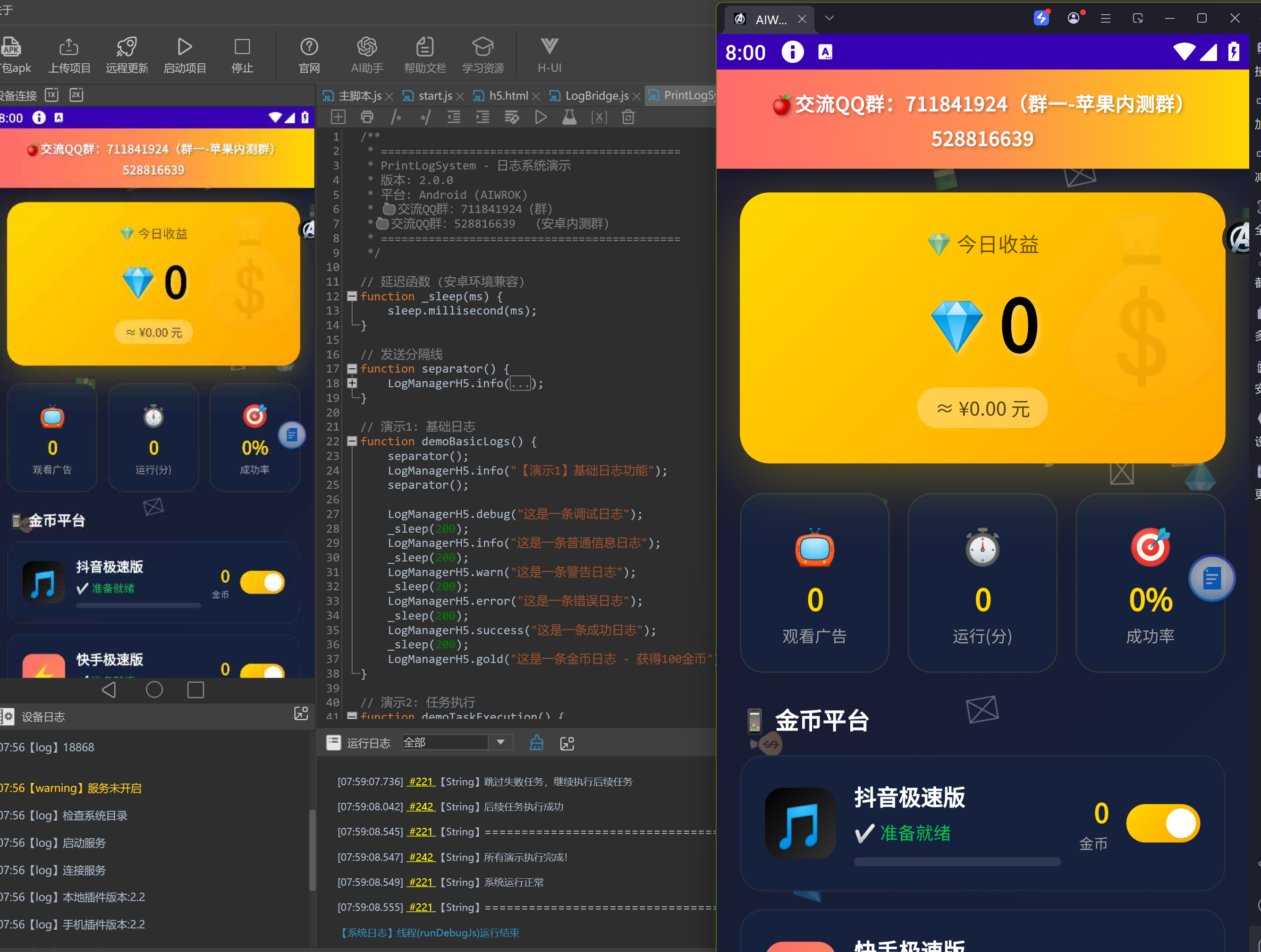
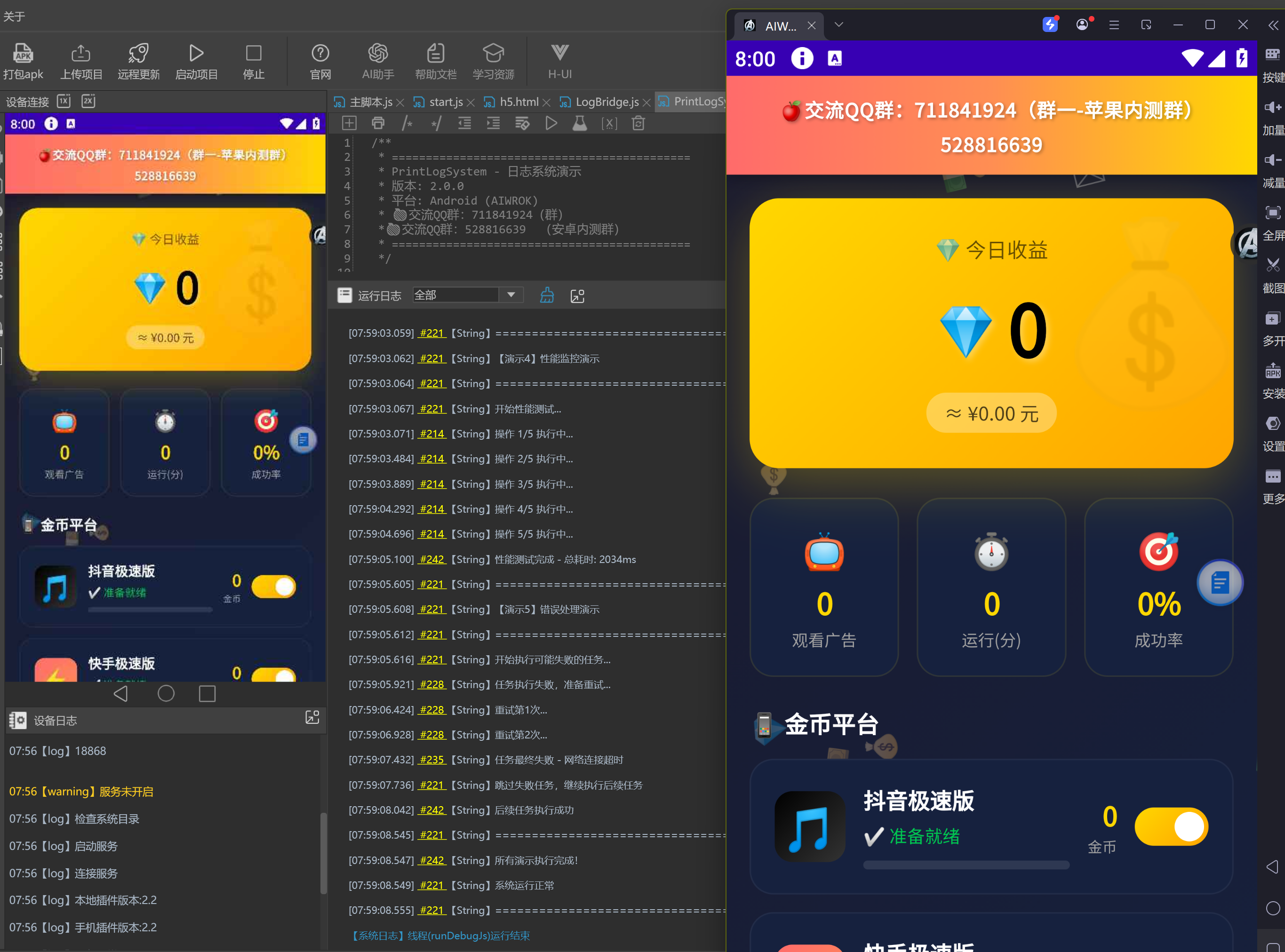
安卓H5日志打印运行过程例子
H5日志打印运行过程例子.zip
(40.16 KB, 下载次数: 126)
2026-4-9 08:09 上传
点击文件名下载附件
<!DOCTYPE html>
<!--
🍎交流QQ群:711841924(群一 - 苹果内测群)
🍎交流QQ群:528816639
-->
<html lang="zh-CN">
<head>
<meta charset="UTF-8">
<meta name="viewport" content="width=device-width, initial-scale=1.0, maximum-scale=1.0, user-scalable=no">
<meta name="apple-mobile-web-app-capable" content="yes">
<meta name="apple-mobile-web-app-status-bar-style" content="black-translucent">
<title>💰 金币收割机 Pro - 自动化撸金币神器</title>
<style>
/* ============================================
* 金币收割机 Pro - 样式定义
* 功能: 自动化看广告撸金币系统
* ============================================
*/
* { margin: 0; padding: 0; box-sizing: border-box; }
:root {
--gold: #FFD700;
--gold-dark: #FFA500;
--money-green: #00C851;
--vip-purple: #9C27B0;
--bg-dark: #1a1a2e;
--bg-card: #16213e;
--text-primary: #ffffff;
--text-secondary: #a0a0a0;
}
body {
font-family: -apple-system, BlinkMacSystemFont, 'SF Pro Display', sans-serif;
background: linear-gradient(135deg, #1a1a2e 0%, #16213e 50%, #0f0f23 100%);
color: var(--text-primary);
min-height: 100vh;
overflow-x: hidden;
}
/* 金币飘落动画背景 */
.coins-rain {
position: fixed;
top: 0;
left: 0;
width: 100%;
height: 100%;
pointer-events: none;
z-index: 0;
overflow: hidden;
}
.coin {
position: absolute;
font-size: 20px;
animation: coinFall linear infinite;
opacity: 0.3;
}
@keyframes coinFall {
0% { transform: translateY(-100px) rotate(0deg); opacity: 0; }
10% { opacity: 0.3; }
90% { opacity: 0.3; }
100% { transform: translateY(100vh) rotate(360deg); opacity: 0; }
}
/* QQ群信息标题栏 */
.qq-group-bar {
background: linear-gradient(90deg, #FF6B6B 0%, #FF8E53 50%, #FFD700 100%);
padding: 10px 16px;
text-align: center;
position: relative;
z-index: 20;
box-shadow: 0 2px 10px rgba(0,0,0,0.3);
}
.qq-group-text {
font-size: 13px;
font-weight: 700;
color: #fff;
text-shadow: 1px 1px 2px rgba(0,0,0,0.3);
letter-spacing: 0.5px;
}
.app-container {
position: relative;
z-index: 10;
max-width: 480px;
margin: 0 auto;
padding: 16px;
}
/* 顶部金币统计 */
.gold-header {
background: linear-gradient(135deg, #FFD700 0%, #FFA500 100%);
border-radius: 20px;
padding: 24px;
text-align: center;
margin-bottom: 20px;
box-shadow: 0 10px 40px rgba(255, 215, 0, 0.3);
position: relative;
overflow: hidden;
}
.gold-header::before {
content: '💰';
position: absolute;
font-size: 120px;
opacity: 0.1;
right: -20px;
top: -20px;
}
.today-earnings {
font-size: 14px;
color: rgba(0,0,0,0.6);
margin-bottom: 8px;
font-weight: 600;
}
.gold-amount {
font-size: 48px;
font-weight: 900;
color: #000;
text-shadow: 2px 2px 4px rgba(255,255,255,0.3);
display: flex;
align-items: center;
justify-content: center;
gap: 8px;
}
.gold-amount::before {
content: '💎';
font-size: 32px;
}
.gold-convert {
font-size: 13px;
color: rgba(0,0,0,0.7);
margin-top: 8px;
background: rgba(255,255,255,0.3);
display: inline-block;
padding: 4px 12px;
border-radius: 20px;
}
/* 统计卡片 */
.stats-row {
display: grid;
grid-template-columns: repeat(3, 1fr);
gap: 12px;
margin-bottom: 20px;
}
.stat-box {
background: var(--bg-card);
border-radius: 16px;
padding: 16px 8px;
text-align: center;
border: 1px solid rgba(255,215,0,0.1);
}
.stat-icon {
font-size: 24px;
margin-bottom: 4px;
}
.stat-value {
font-size: 20px;
font-weight: 800;
color: var(--gold);
}
.stat-label {
font-size: 11px;
color: var(--text-secondary);
margin-top: 2px;
}
/* 平台列表 */
.platforms-section {
margin-bottom: 20px;
}
.section-title {
font-size: 16px;
font-weight: 700;
margin-bottom: 12px;
display: flex;
align-items: center;
gap: 8px;
}
.platform-card {
background: var(--bg-card);
border-radius: 16px;
padding: 16px;
margin-bottom: 12px;
border: 1px solid rgba(255,255,255,0.05);
display: flex;
align-items: center;
gap: 12px;
transition: all 0.3s ease;
}
.platform-card:hover {
border-color: rgba(255,215,0,0.3);
transform: translateX(4px);
}
.platform-icon {
width: 48px;
height: 48px;
border-radius: 12px;
display: flex;
align-items: center;
justify-content: center;
font-size: 28px;
flex-shrink: 0;
}
.platform-icon.douyin { background: linear-gradient(135deg, #000 0%, #333 100%); }
.platform-icon.kuaishou { background: linear-gradient(135deg, #FF6B6B 0%, #FF8E53 100%); }
.platform-icon.baidu { background: linear-gradient(135deg, #2932E1 0%, #4B5CFF 100%); }
.platform-icon.fanqie { background: linear-gradient(135deg, #FF6B6B 0%, #FF8E8E 100%); }
.platform-info {
flex: 1;
}
.platform-name {
font-size: 15px;
font-weight: 700;
margin-bottom: 4px;
}
.platform-status {
font-size: 12px;
color: var(--text-secondary);
}
.platform-status.ready { color: var(--money-green); }
.platform-status.running { color: var(--gold); }
.platform-status.cooldown { color: #FF6B6B; }
.platform-earnings {
text-align: right;
}
.earnings-amount {
font-size: 18px;
font-weight: 800;
color: var(--gold);
}
.earnings-label {
font-size: 10px;
color: var(--text-secondary);
}
/* 开关 */
.switch {
position: relative;
width: 50px;
height: 26px;
flex-shrink: 0;
}
.switch input {
opacity: 0;
width: 0;
height: 0;
}
.slider {
position: absolute;
cursor: pointer;
top: 0;
left: 0;
right: 0;
bottom: 0;
background-color: #333;
transition: .4s;
border-radius: 26px;
}
.slider:before {
position: absolute;
content: "";
height: 20px;
width: 20px;
left: 3px;
bottom: 3px;
background-color: white;
transition: .4s;
border-radius: 50%;
}
input:checked + .slider {
background: linear-gradient(135deg, #FFD700 0%, #FFA500 100%);
}
input:checked + .slider:before {
transform: translateX(24px);
}
/* 控制按钮 */
.control-panel {
background: var(--bg-card);
border-radius: 20px;
padding: 20px;
margin-bottom: 20px;
}
.main-btn {
width: 100%;
padding: 18px;
border: none;
border-radius: 16px;
font-size: 18px;
font-weight: 800;
cursor: pointer;
transition: all 0.3s ease;
display: flex;
align-items: center;
justify-content: center;
gap: 8px;
margin-bottom: 12px;
}
.btn-start {
background: linear-gradient(135deg, #00C851 0%, #00E676 100%);
color: white;
box-shadow: 0 8px 32px rgba(0, 200, 81, 0.4);
}
.btn-start:hover {
transform: translateY(-2px);
box-shadow: 0 12px 40px rgba(0, 200, 81, 0.5);
}
.btn-stop {
background: linear-gradient(135deg, #FF6B6B 0%, #FF8E8E 100%);
color: white;
box-shadow: 0 8px 32px rgba(255, 107, 107, 0.4);
display: none;
}
.btn-stop.active {
display: flex;
}
.btn-start.hidden {
display: none;
}
/* 模式选择 */
.mode-selector {
display: grid;
grid-template-columns: repeat(3, 1fr);
gap: 8px;
}
.mode-btn {
padding: 12px 8px;
border: 2px solid rgba(255,255,255,0.1);
background: transparent;
border-radius: 12px;
color: var(--text-secondary);
font-size: 12px;
font-weight: 600;
cursor: pointer;
transition: all 0.3s ease;
}
.mode-btn.active {
border-color: var(--gold);
color: var(--gold);
background: rgba(255, 215, 0, 0.1);
}
/* 日志区域 - 放大版 */
.log-section {
background: var(--bg-card);
border-radius: 20px;
padding: 20px;
margin-top: 20px;
border: 2px solid rgba(255, 215, 0, 0.2);
box-shadow: 0 8px 32px rgba(0, 0, 0, 0.3);
}
.log-header {
display: flex;
justify-content: space-between;
align-items: center;
margin-bottom: 16px;
padding-bottom: 12px;
border-bottom: 1px solid rgba(255, 255, 255, 0.1);
}
.log-title {
display: flex;
align-items: center;
gap: 10px;
}
.log-title-icon {
font-size: 20px;
}
.log-title-text {
font-size: 16px;
font-weight: 700;
color: var(--gold);
}
.log-stats {
display: flex;
gap: 12px;
}
.log-stat {
background: rgba(255, 215, 0, 0.1);
padding: 4px 12px;
border-radius: 12px;
font-size: 11px;
color: var(--gold);
}
.log-toolbar {
display: flex;
gap: 8px;
margin-bottom: 12px;
flex-wrap: wrap;
}
.log-btn {
background: rgba(255, 255, 255, 0.1);
border: 1px solid rgba(255, 255, 255, 0.2);
color: var(--text-secondary);
padding: 8px 16px;
border-radius: 8px;
font-size: 12px;
cursor: pointer;
transition: all 0.2s ease;
display: flex;
align-items: center;
gap: 6px;
}
.log-btn:hover {
background: rgba(255, 215, 0, 0.2);
border-color: var(--gold);
color: var(--gold);
}
.log-btn.active {
background: rgba(255, 215, 0, 0.3);
border-color: var(--gold);
color: var(--gold);
}
.log-filter-bar {
display: flex;
gap: 6px;
margin-bottom: 12px;
flex-wrap: wrap;
}
.filter-btn {
background: rgba(255, 255, 255, 0.05);
border: 1px solid rgba(255, 255, 255, 0.1);
color: var(--text-secondary);
padding: 6px 12px;
border-radius: 20px;
font-size: 11px;
cursor: pointer;
transition: all 0.2s ease;
}
.filter-btn:hover {
background: rgba(255, 255, 255, 0.1);
}
.filter-btn.active {
background: rgba(255, 215, 0, 0.2);
border-color: var(--gold);
color: var(--gold);
}
.log-container {
background: linear-gradient(135deg, rgba(0, 0, 0, 0.4) 0%, rgba(15, 15, 35, 0.6) 100%);
border-radius: 16px;
padding: 16px;
max-height: 600px;
min-height: 400px;
overflow-y: auto;
font-family: 'SF Mono', 'Monaco', 'Menlo', 'Consolas', monospace;
font-size: 13px;
line-height: 1.8;
border: 1px solid rgba(255, 255, 255, 0.05);
}
.log-container::-webkit-scrollbar {
width: 8px;
}
.log-container::-webkit-scrollbar-track {
background: rgba(255, 255, 255, 0.05);
border-radius: 4px;
}
.log-container::-webkit-scrollbar-thumb {
background: rgba(255, 215, 0, 0.3);
border-radius: 4px;
}
.log-container::-webkit-scrollbar-thumb:hover {
background: rgba(255, 215, 0, 0.5);
}
.log-entry {
padding: 8px 12px;
margin-bottom: 4px;
border-radius: 8px;
background: rgba(255, 255, 255, 0.02);
border-left: 3px solid transparent;
display: flex;
gap: 10px;
align-items: flex-start;
animation: logFadeIn 0.3s ease;
}
@keyframes logFadeIn {
from { opacity: 0; transform: translateX(-10px); }
to { opacity: 1; transform: translateX(0); }
}
.log-entry:hover {
background: rgba(255, 255, 255, 0.05);
}
.log-entry.info { border-left-color: #3498db; }
.log-entry.success { border-left-color: #2ecc71; }
.log-entry.gold { border-left-color: #FFD700; }
.log-entry.error { border-left-color: #e74c3c; }
.log-entry.warn { border-left-color: #f39c12; }
.log-entry.debug { border-left-color: #9b59b6; }
.log-icon {
font-size: 14px;
flex-shrink: 0;
width: 20px;
text-align: center;
}
.log-time {
color: #666;
flex-shrink: 0;
font-size: 11px;
min-width: 70px;
}
.log-level {
font-size: 10px;
padding: 2px 6px;
border-radius: 4px;
font-weight: 600;
text-transform: uppercase;
flex-shrink: 0;
}
.log-level.info { background: rgba(52, 152, 219, 0.3); color: #3498db; }
.log-level.success { background: rgba(46, 204, 113, 0.3); color: #2ecc71; }
.log-level.gold { background: rgba(255, 215, 0, 0.3); color: #FFD700; }
.log-level.error { background: rgba(231, 76, 60, 0.3); color: #e74c3c; }
.log-level.warn { background: rgba(243, 156, 18, 0.3); color: #f39c12; }
.log-level.debug { background: rgba(155, 89, 182, 0.3); color: #9b59b6; }
.log-message {
color: #e0e0e0;
word-break: break-all;
flex: 1;
}
.log-success { color: #2ecc71; }
.log-gold { color: #FFD700; }
.log-error { color: #e74c3c; }
.log-warn { color: #f39c12; }
.log-info { color: #3498db; }
.log-empty {
text-align: center;
padding: 40px 20px;
color: #666;
}
.log-empty-icon {
font-size: 48px;
margin-bottom: 16px;
opacity: 0.5;
}
.log-empty-text {
font-size: 14px;
}
/* 动画 */
@keyframes pulse-gold {
0%, 100% { box-shadow: 0 0 20px rgba(255, 215, 0, 0.4); }
50% { box-shadow: 0 0 40px rgba(255, 215, 0, 0.6); }
}
.earning {
animation: pulse-gold 2s infinite;
}
/* Toast */
.toast {
position: fixed;
bottom: 100px;
left: 50%;
transform: translateX(-50%) translateY(100px);
background: linear-gradient(135deg, #FFD700 0%, #FFA500 100%);
color: #000;
padding: 16px 32px;
border-radius: 50px;
font-weight: 700;
opacity: 0;
transition: all 0.3s ease;
z-index: 9999;
box-shadow: 0 8px 32px rgba(255, 215, 0, 0.4);
}
.toast.show {
opacity: 1;
transform: translateX(-50%) translateY(0);
}
/* 进度条 */
.progress-bar {
height: 6px;
background: rgba(255,255,255,0.1);
border-radius: 3px;
overflow: hidden;
margin-top: 8px;
}
.progress-fill {
height: 100%;
background: linear-gradient(90deg, #FFD700 0%, #FFA500 100%);
border-radius: 3px;
transition: width 0.5s ease;
}
</style>
</head>
<body>
<!-- 金币飘落背景 -->
<div class="coins-rain" id="coinsRain"></div>
<!-- QQ群信息标题栏 -->
<div class="qq-group-bar">
<span class="qq-group-text">🍎交流QQ群:711841924(群一-苹果内测群) 528816639</span>
</div>
<div class="app-container">
<!-- 顶部金币统计 -->
<div class="gold-header">
<div class="today-earnings">💎 今日收益</div>
<div class="gold-amount" id="todayGold">0</div>
<div class="gold-convert">≈ ¥<span id="rmbValue">0.00</span> 元</div>
</div>
<!-- 统计卡片 -->
<div class="stats-row">
<div class="stat-box">
<div class="stat-icon">📺</div>
<div class="stat-value" id="adCount">0</div>
<div class="stat-label">观看广告</div>
</div>
<div class="stat-box">
<div class="stat-icon">⏱️</div>
<div class="stat-value" id="runTime">0</div>
<div class="stat-label">运行(分)</div>
</div>
<div class="stat-box">
<div class="stat-icon">🎯</div>
<div class="stat-value" id="successRate">0%</div>
<div class="stat-label">成功率</div>
</div>
</div>
<!-- 平台列表 -->
<div class="platforms-section">
<div class="section-title">📱 金币平台</div>
<div class="platform-card">
<div class="platform-icon douyin">🎵</div>
<div class="platform-info">
<div class="platform-name">抖音极速版</div>
<div class="platform-status ready" id="status-douyin">✅ 准备就绪</div>
<div class="progress-bar"><div class="progress-fill" id="progress-douyin" style="width: 0%"></div></div>
</div>
<div class="platform-earnings">
<div class="earnings-amount" id="gold-douyin">0</div>
<div class="earnings-label">金币</div>
</div>
<label class="switch">
<input type="checkbox" id="enable-douyin" checked>
<span class="slider"></span>
</label>
</div>
<div class="platform-card">
<div class="platform-icon kuaishou">⚡</div>
<div class="platform-info">
<div class="platform-name">快手极速版</div>
<div class="platform-status ready" id="status-kuaishou">✅ 准备就绪</div>
<div class="progress-bar"><div class="progress-fill" id="progress-kuaishou" style="width: 0%"></div></div>
</div>
<div class="platform-earnings">
<div class="earnings-amount" id="gold-kuaishou">0</div>
<div class="earnings-label">金币</div>
</div>
<label class="switch">
<input type="checkbox" id="enable-kuaishou" checked>
<span class="slider"></span>
</label>
</div>
<div class="platform-card">
<div class="platform-icon baidu">🔍</div>
<div class="platform-info">
<div class="platform-name">百度极速版</div>
<div class="platform-status ready" id="status-baidu">✅ 准备就绪</div>
<div class="progress-bar"><div class="progress-fill" id="progress-baidu" style="width: 0%"></div></div>
</div>
<div class="platform-earnings">
<div class="earnings-amount" id="gold-baidu">0</div>
<div class="earnings-label">金币</div>
</div>
<label class="switch">
<input type="checkbox" id="enable-baidu" checked>
<span class="slider"></span>
</label>
</div>
<div class="platform-card">
<div class="platform-icon fanqie">📖</div>
<div class="platform-info">
<div class="platform-name">番茄小说</div>
<div class="platform-status ready" id="status-fanqie">✅ 准备就绪</div>
<div class="progress-bar"><div class="progress-fill" id="progress-fanqie" style="width: 0%"></div></div>
</div>
<div class="platform-earnings">
<div class="earnings-amount" id="gold-fanqie">0</div>
<div class="earnings-label">金币</div>
</div>
<label class="switch">
<input type="checkbox" id="enable-fanqie" checked>
<span class="slider"></span>
</label>
</div>
</div>
<!-- 控制面板 -->
<div class="control-panel">
<button class="main-btn btn-start" id="btnStart" onclick="startHarvest()">
<span>🚀</span>
<span>开始收割金币</span>
</button>
<button class="main-btn btn-stop" id="btnStop" onclick="stopHarvest()">
<span>⏹️</span>
<span>停止收割</span>
</button>
<div class="mode-selector">
<button class="mode-btn active" data-mode="smart" onclick="setMode('smart')">
🤖 智能模式
</button>
<button class="mode-btn" data-mode="aggressive" onclick="setMode('aggressive')">
⚡ 激进模式
</button>
<button class="mode-btn" data-mode="safe" onclick="setMode('safe')">
🛡️ 安全模式
</button>
</div>
</div>
<!-- 日志区域 - 放大版 -->
<div class="log-section">
<div class="log-header">
<div class="log-title">
<span class="log-title-icon">📋</span>
<span class="log-title-text">实时日志窗口</span>
</div>
<div class="log-stats">
<div class="log-stat" id="logCount">日志: 0</div>
<div class="log-stat" id="errorCount">错误: 0</div>
</div>
</div>
<div class="log-toolbar">
<button class="log-btn" onclick="clearLogs()">
<span>🗑️</span>
<span>清空日志</span>
</button>
<button class="log-btn" onclick="exportLogs()">
<span>📤</span>
<span>导出日志</span>
</button>
<button class="log-btn" onclick="scrollToBottom()">
<span>⬇️</span>
<span>滚动到底部</span>
</button>
<button class="log-btn" onclick="toggleAutoScroll()">
<span id="autoScrollIcon">✅</span>
<span>自动滚动</span>
</button>
</div>
<div class="log-filter-bar">
<button class="filter-btn active" data-level="all" onclick="filterLogs('all')">全部</button>
<button class="filter-btn" data-level="info" onclick="filterLogs('info')">ℹ️ INFO</button>
<button class="filter-btn" data-level="success" onclick="filterLogs('success')">✅ SUCCESS</button>
<button class="filter-btn" data-level="gold" onclick="filterLogs('gold')">💰 GOLD</button>
<button class="filter-btn" data-level="warn" onclick="filterLogs('warn')">⚠️ WARN</button>
<button class="filter-btn" data-level="error" onclick="filterLogs('error')">❌ ERROR</button>
</div>
<div class="log-container" id="logContainer">
<div class="log-empty">
<div class="log-empty-icon">🚀</div>
<div class="log-empty-text">等待日志输出...</div>
</div>
</div>
</div>
</div>
<!-- Toast -->
<div class="toast" id="toast"></div>
<script>
// ============================================
// 金币收割机 Pro - 核心逻辑
// ============================================
// ES5兼容的日志接收函数(供Native调用)
function addLog(message, type) {
type = type || 'info';
var container = document.getElementById('logContainer');
if (!container) return;
var icons = {
info: '[I]',
success: '[S]',
gold: '[G]',
error: '[E]',
warn: '[W]',
debug: '[D]'
};
var icon = icons[type] || '[I]';
// 移除空状态提示
var emptyState = container.querySelector('.log-empty');
if (emptyState) emptyState.remove();
// 创建日志条目(简化版,无时间戳)
var entry = document.createElement('div');
entry.className = 'log-entry ' + type;
entry.setAttribute('data-level', type);
entry.innerHTML =
'<span class="log-icon">' + icon + '</span>' +
'<span class="log-level ' + type + '">' + type.toUpperCase() + '</span>' +
'<span class="log-message">' + message + '</span>';
container.appendChild(entry);
container.scrollTop = container.scrollHeight;
}
const CONFIG = {
VERSION: '2.0.0',
GOLD_TO_RMB: 0.0001, // 金币转人民币比例
AD_WATCH_TIME: 35000, // 广告观看时间(毫秒)
COOLDOWN_TIME: 5000, // 冷却时间
};
const state = {
isRunning: false,
mode: 'smart',
todayGold: 0,
adCount: 0,
startTime: null,
autoScroll: true,
currentFilter: 'all',
logCount: 0,
errorCount: 0,
platforms: {
douyin: { enabled: true, gold: 0, status: 'ready', name: '抖音极速版' },
kuaishou: { enabled: true, gold: 0, status: 'ready', name: '快手极速版' },
baidu: { enabled: true, gold: 0, status: 'ready', name: '百度极速版' },
fanqie: { enabled: true, gold: 0, status: 'ready', name: '番茄小说' }
}
};
const LOG_ICONS = {
info: 'ℹ️',
success: '✅',
gold: '💰',
error: '❌',
warn: '⚠️',
debug: '🔍'
};
// 初始化金币雨
function initCoinRain() {
const container = document.getElementById('coinsRain');
const coins = ['💰', '💎', '🪙', '💵', '💴'];
for (let i = 0; i < 20; i++) {
const coin = document.createElement('div');
coin.className = 'coin';
coin.textContent = coins[Math.floor(Math.random() * coins.length)];
coin.style.left = Math.random() * 100 + '%';
coin.style.animationDuration = (Math.random() * 5 + 5) + 's';
coin.style.animationDelay = Math.random() * 5 + 's';
container.appendChild(coin);
}
}
// 添加日志 - 增强版
function addLog(message, type) {
type = type || 'info';
var container = document.getElementById('logContainer');
var icon = LOG_ICONS[type] || 'ℹ️';
// 移除空状态提示
var emptyState = container.querySelector('.log-empty');
if (emptyState) emptyState.remove();
// 创建日志条目
var entry = document.createElement('div');
entry.className = 'log-entry ' + type;
entry.setAttribute('data-level', type);
entry.innerHTML =
'<span class="log-icon">' + icon + '</span>' +
'<span class="log-level ' + type + '">' + type.toUpperCase() + '</span>' +
'<span class="log-message">' + escapeHtml(message) + '</span>';
// 根据过滤器决定是否显示
if (state.currentFilter !== 'all' && type !== state.currentFilter) {
entry.style.display = 'none';
}
container.appendChild(entry);
// 更新统计
state.logCount++;
if (type === 'error') state.errorCount++;
updateLogStats();
// 自动滚动
if (state.autoScroll) {
scrollToBottom();
}
// 限制日志数量
while (container.children.length > 200) {
container.removeChild(container.firstChild);
}
}
// HTML转义
function escapeHtml(text) {
const div = document.createElement('div');
div.textContent = text;
return div.innerHTML;
}
// 更新日志统计
function updateLogStats() {
document.getElementById('logCount').textContent = '日志: ' + state.logCount;
document.getElementById('errorCount').textContent = '错误: ' + state.errorCount;
}
// 滚动到底部
function scrollToBottom() {
const container = document.getElementById('logContainer');
container.scrollTop = container.scrollHeight;
}
// 切换自动滚动
function toggleAutoScroll() {
state.autoScroll = !state.autoScroll;
document.getElementById('autoScrollIcon').textContent = state.autoScroll ? '✅' : '❌';
}
// 过滤日志
function filterLogs(level) {
state.currentFilter = level;
// 更新按钮状态
document.querySelectorAll('.filter-btn').forEach(btn => {
btn.classList.toggle('active', btn.dataset.level === level);
});
// 过滤显示
const container = document.getElementById('logContainer');
const entries = container.querySelectorAll('.log-entry');
entries.forEach(entry => {
const entryLevel = entry.getAttribute('data-level');
if (level === 'all' || entryLevel === level) {
entry.style.display = 'flex';
} else {
entry.style.display = 'none';
}
});
}
// 导出日志
function exportLogs() {
const container = document.getElementById('logContainer');
const entries = container.querySelectorAll('.log-entry');
let text = '';
entries.forEach(entry => {
const level = entry.querySelector('.log-level').textContent;
const msg = entry.querySelector('.log-message').textContent;
text += '[' + level + '] ' + msg + '\n';
});
// 尝试通过桥接发送
if (window.webkit && window.webkit.messageHandlers && window.webkit.messageHandlers.exportLogs) {
window.webkit.messageHandlers.exportLogs.postMessage(text);
} else {
// 显示提示
showToast('📤 日志已导出 (' + entries.length + ' 条)');
console.log('导出日志:\n' + text);
}
}
// 显示Toast
function showToast(message) {
const toast = document.getElementById('toast');
toast.textContent = message;
toast.classList.add('show');
setTimeout(() => toast.classList.remove('show'), 3000);
}
// 更新金币显示
function updateGoldDisplay() {
document.getElementById('todayGold').textContent = state.todayGold.toLocaleString();
document.getElementById('rmbValue').textContent = (state.todayGold * CONFIG.GOLD_TO_RMB).toFixed(2);
document.getElementById('adCount').textContent = state.adCount;
// 更新运行时间
if (state.startTime) {
const minutes = Math.floor((Date.now() - state.startTime) / 60000);
document.getElementById('runTime').textContent = minutes;
}
// 更新各平台金币
Object.keys(state.platforms).forEach(key => {
document.getElementById('gold-' + key).textContent = state.platforms[key].gold;
});
}
// 设置模式
function setMode(mode) {
state.mode = mode;
document.querySelectorAll('.mode-btn').forEach(btn => {
btn.classList.toggle('active', btn.dataset.mode === mode);
});
addLog(`切换到${mode === 'smart' ? '智能' : mode === 'aggressive' ? '激进' : '安全'}模式`, 'info');
}
// 开始收割
async function startHarvest() {
if (state.isRunning) return;
state.isRunning = true;
state.startTime = Date.now();
document.getElementById('btnStart').classList.add('hidden');
document.getElementById('btnStop').classList.add('active');
addLog('🚀 开始自动收割金币!', 'success');
showToast('🚀 金币收割已启动!');
// 开始收割循环
harvestLoop();
}
// 停止收割
function stopHarvest() {
state.isRunning = false;
document.getElementById('btnStart').classList.remove('hidden');
document.getElementById('btnStop').classList.remove('active');
// 重置所有平台状态
Object.keys(state.platforms).forEach(key => {
state.platforms[key].status = 'ready';
updatePlatformStatus(key, 'ready');
});
addLog('⏹️ 金币收割已停止', 'info');
showToast('⏹️ 已停止收割');
}
// 收割循环
async function harvestLoop() {
while (state.isRunning) {
const enabledPlatforms = Object.keys(state.platforms).filter(key =>
document.getElementById('enable-' + key).checked
);
if (enabledPlatforms.length === 0) {
addLog('⚠️ 请至少选择一个平台', 'warning');
stopHarvest();
break;
}
for (const platform of enabledPlatforms) {
if (!state.isRunning) break;
await harvestPlatform(platform);
}
// 根据模式调整间隔
const interval = state.mode === 'aggressive' ? 2000 : state.mode === 'safe' ? 8000 : 5000;
await sleep(interval);
}
}
// 收割单个平台
async function harvestPlatform(platform) {
const p = state.platforms[platform];
p.status = 'running';
updatePlatformStatus(platform, 'running');
addLog(`📱 开始收割 ${p.name}`, 'info');
// 模拟打开应用
await sleep(1000);
// 模拟看广告过程
for (let i = 0; i <= 100; i += 10) {
if (!state.isRunning) break;
document.getElementById('progress-' + platform).style.width = i + '%';
await sleep(CONFIG.AD_WATCH_TIME / 10);
}
// 获得金币奖励
const reward = Math.floor(Math.random() * 500) + 200;
p.gold += reward;
state.todayGold += reward;
state.adCount++;
addLog(`💰 ${p.name} 获得 ${reward} 金币!`, 'gold');
// 更新显示
updateGoldDisplay();
// 冷却
p.status = 'cooldown';
updatePlatformStatus(platform, 'cooldown');
await sleep(CONFIG.COOLDOWN_TIME);
p.status = 'ready';
updatePlatformStatus(platform, 'ready');
document.getElementById('progress-' + platform).style.width = '0%';
}
// 更新平台状态显示
function updatePlatformStatus(platform, status) {
const statusEl = document.getElementById('status-' + platform);
const texts = {
ready: '✅ 准备就绪',
running: '⚡ 正在收割...',
cooldown: '⏱️ 冷却中...'
};
statusEl.textContent = texts[status];
statusEl.className = 'platform-status ' + status;
}
// 清空日志
function clearLogs() {
state.logCount = 0;
state.errorCount = 0;
updateLogStats();
document.getElementById('logContainer').innerHTML =
'<div class="log-empty">' +
'<div class="log-empty-icon">🚀</div>' +
'<div class="log-empty-text">等待日志输出...</div>' +
'</div>';
showToast('🗑️ 日志已清空');
}
// 工具函数
function sleep(ms) {
return new Promise(resolve => setTimeout(resolve, ms));
}
// 初始化
document.addEventListener('DOMContentLoaded', function() {
initCoinRain();
updateGoldDisplay();
addLog('💎 金币收割机 Pro v' + CONFIG.VERSION + ' 已就绪', 'success');
addLog('📱 支持平台: 抖音/快手/百度/番茄', 'info');
// 自动滑动三次
setTimeout(function() {
for (var i = 0; i < 3; i++) {
setTimeout(function() {
window.scrollBy(0, 300);
}, i * 500);
}
}, 1000);
});
// 监听平台开关
Object.keys(state.platforms).forEach(key => {
document.getElementById('enable-' + key).addEventListener('change', function() {
const action = this.checked ? '启用' : '禁用';
addLog(`${action} ${state.platforms[key].name}`, 'info');
});
});
</script>
</body>
</html>
复制代码
// 🍎交流QQ群:711841924(群)
// 🍎交流QQ群:528816639 (安卓内测群)
// 初始化一个activity页面
var ac = new activity();
ac.loadXML(`
<LinearLayout xmlns:android="http://schemas.android.com/apk/res/android"
android:layout_width="match_parent"
android:layout_height="match_parent"
android:orientation="vertical"
>
<WebView
android:id="@+id/web"
android:layout_width="match_parent"
android:layout_height="0dp"
android:layout_weight="1" />
</LinearLayout>
`);
// 延迟确保布局加载完成
sleep.millisecond(400);
// 获取 WebView 组件
var web1 = ac.findWebViewById('web');
// 将WebView对象暴露为全局变量,供主脚本使用
global.web1 = web1;
// 加载本地 HTML 文件(使用绝对路径)
web1.url('/代码/h5.html');
// 三秒倒计时
printl("\n3 秒后启动...");
for (var i = 3; i > 0; i--) {
printl(i + "...");
sleep.millisecond(1000);
}
printl("启动完成!\n");
// 导入日志桥接器
Import("LogBridge.js");
// 初始化日志桥接(会阻塞等待WebView加载完成)
LogManagerH5.init(web1, ac);
// 定义 H5 中调用的函数
function test(arg) {
LogManagerH5.info("我被 H5 调用了,参数是: " + arg);
}
// 定义返回桌面的函数,供H5页面调用
function returnToHome() {
LogManagerH5.info("执行返回桌面操作");
// 安卓环境下的返回桌面操作
if (typeof device !== 'undefined' && device.home) {
device.home();
} else {
LogManagerH5.warn("返回桌面功能在当前环境不可用");
}
}
// 发送测试日志到H5界面
LogManagerH5.success("系统启动成功");
LogManagerH5.info("WebView已就绪");
// ============================================
// 导入并执行 PrintLogSystem 演示
// ============================================
// 导入并执行 PrintLogSystem 演示
Import("PrintLogSystem.js");
// 延迟执行,确保文件加载完成
sleep.millisecond(100);
// 执行演示(确保 PrintLogSystem.js 已加载)
if (typeof runPrintLogSystemDemo === 'function') {
runPrintLogSystemDemo();
} else {
LogManagerH5.error("PrintLogSystem.js 加载失败");
}
/**
* ============================================
* 🍎 print日志系统完整示例
* 功能: 日志记录、调试输出、画中画管理
* 交流QQ群: 711841924 (群一) / 528816639 (苹果内测群)
* ============================================
*/
复制代码
上一篇:
AIWROK软件字符串方法实用案例
下一篇:
苹果脚本TabView金黄色风格例子
发表于 2026-4-9 08:10:42
举报
回复
分享
返回列表
发新帖
本版积分规则
高级模式
B
Color
Image
Link
Quote
Code
Smilies
您需要登录后才可以回帖
登录
|
立即注册
黑夜模式
快速发帖
返回列表
返回顶部